
Are you considering whether Xero is the right accounting software for your business? This Xero review explains what it does, who it’s best for, key features, pricing, advantages and drawbacks, and common questions to help you decide.
Running a business often means juggling invoices, receipts, bills, tax deadlines, and keeping track of profits. That can quickly become overwhelming. Accounting software like Xero centralizes your financial tasks so you spend less time on bookkeeping and more time on your business.
Rather than managing multiple spreadsheets and guessing at numbers, Xero consolidates your small business finances in one place: you can create and send invoices, connect your bank, track expenses, run reports, and view cash flow in real time. For freelancers and small business owners, that can save hours, reduce stress, and improve financial decisions.
Xero Review
This review covers what Xero does, who benefits most, pricing tiers, pros and cons, and answers to frequent questions so you can determine whether Xero fits your needs.
What is Xero?
Xero is cloud-based accounting software designed for small businesses. Being cloud-based means you can access your account from any device with internet access—phone, tablet, or computer—without installing software on a single machine.
With Xero you can:
- Send invoices and quotes
- Accept online payments
- Connect and sync your bank account
- Reconcile transactions
- Track bills and expenses
- Run financial reports like profit and loss
- Use a mobile app for work on the go
- Integrate with other tools such as payroll or invoicing apps
Xero is built to help you stay organized and quickly see where your money is going.
Why use accounting software like Xero?
Many entrepreneurs start with spreadsheets, which can work briefly but become difficult to manage as transactions multiply. People switch to accounting software for several reasons:
- Saves time: reduces manual data entry
- Reduces errors: fewer missed or duplicated transactions
- Organized records: simplifies tax preparation
- Accurate numbers: helps you make informed decisions
- Faster payments: streamlined invoicing and payment options
- Cleaner collaboration with accountants: all records in one place
If your bookkeeping is falling behind or you don’t know your financial position, using accounting software can make a significant difference.
Who Xero is best for
Xero is well suited for:
- Freelancers and solopreneurs
- Service-based businesses
- Small businesses with a team
- Anyone seeking cleaner books and simpler tax prep
- Businesses that work with a bookkeeper or accountant
If you only need very basic invoicing, a simpler tool may be sufficient. Xero shines when you want an accounting system that scales.
Xero Features
Below are the core features and how they affect everyday bookkeeping and operations.
1. Invoicing and getting paid
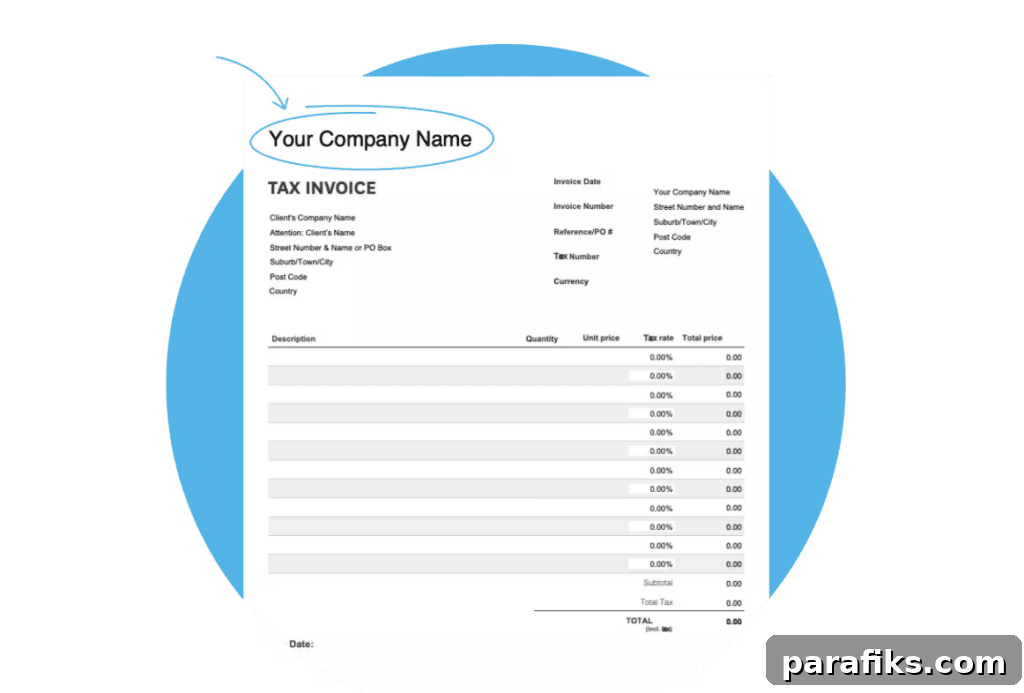
Getting paid on time is essential. Xero makes invoicing straightforward: create and send professional invoices, track when they’re opened, and provide customers with online payment options. You can also prepare quotes and convert approved quotes into invoices to keep workflows streamlined.
2. Bank connections and reconciliation
Connecting your bank to Xero automatically imports transactions, reducing manual entry and errors. Reconciliation matches bank activity to your records so your books stay accurate. Regular reconciliation highlights discrepancies quickly and keeps financial data reliable.
3. Bills and expenses
Track bills and expenses in one place so you always know what’s due and what has been paid. Organizing expenses throughout the year simplifies tax preparation and makes it easier to hand records to a bookkeeper or accountant when needed.
4. Reports and dashboard
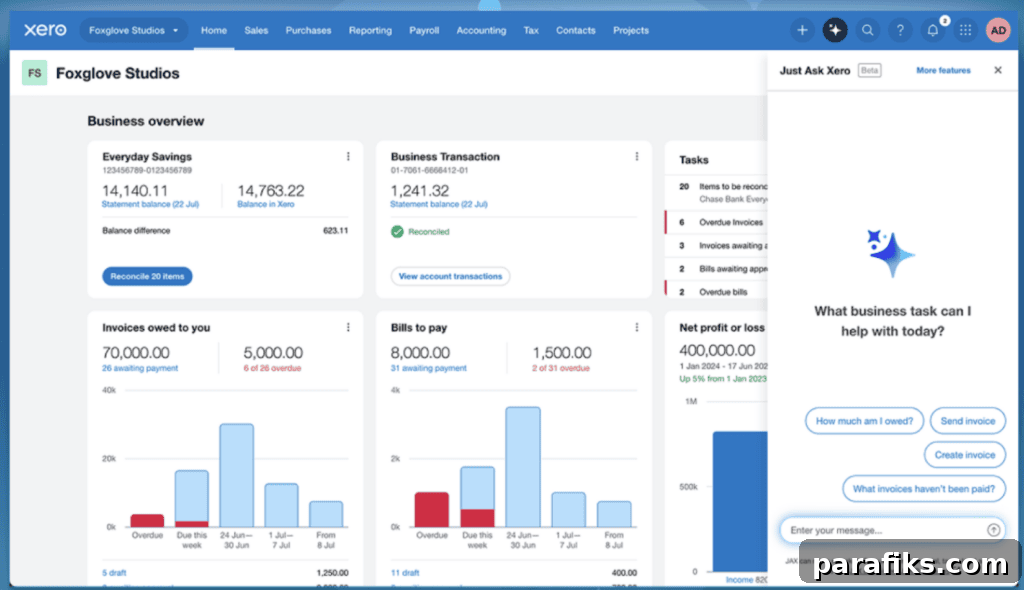
Xero provides a dashboard and common financial statements—balance sheet, income statement, and cash flow statement—so you can monitor performance, profitability, and cash flow trends at a glance.
5. Mobile app
The mobile app lets you manage invoicing, review transactions, and check financials while away from your desk. It’s useful for owners who travel or have limited time to work on a laptop.
6. Payroll option (US, UK, AU and other regions)
If you have employees or plan to hire, payroll can consume significant time. In the United States, Xero integrates with payroll providers to streamline payroll and bookkeeping together, reducing duplicated effort.
Xero Pricing Plans
Xero offers multiple plans aimed at small businesses, typically categorized as Early, Growing, and Established. Prices vary by region and over time, so check current rates before signing up. Generally, plans range from an entry-level option to more advanced tiers with additional features.
Which plan is right for you?
- Early plan: Best for brand-new businesses with minimal invoicing needs. It’s the most budget-friendly option but comes with usage limits.
- Growing plan: Suited to freelancers and small businesses with moderate activity. It offers unlimited invoices and more automation to save time as the business scales.
- Established plan: Designed for businesses requiring advanced features such as multi-currency support, enhanced reporting, and project tracking.
Start with the plan that matches your current needs and upgrade as your business grows to avoid paying for unnecessary features early on.
Xero Pros and Cons
No platform is perfect. Here are the main strengths and limitations to consider.
What’s good about Xero:
- Centralizes finances in one place
- Strong invoicing and bookkeeping features
- Reliable bank connections and reconciliation
- Clear reporting and dashboard for better decision-making
- Works well with accountants and bookkeepers
- Mobile access and many app integrations
- Unlimited users at no extra cost on most plans
Considerations and drawbacks:
- Initial setup can take time for new users
- Might be more than needed for businesses that only require basic invoicing
Xero vs. spreadsheets
Spreadsheets can work early on, but they become hard to maintain with many transactions. Xero typically outperforms spreadsheets in automation, accuracy, speed, and reporting visibility. If your finances feel disorganized, switching to a dedicated accounting system is usually worthwhile.
Xero vs. FreshBooks
Choosing between Xero and FreshBooks depends on your needs. Xero is better suited for businesses that want a complete accounting system with reconciliation, detailed reporting, inventory features, and scalable integrations. FreshBooks focuses on simple, user-friendly invoicing and basic expense tracking, which appeals to solo freelancers and service providers who want minimal setup.
If you expect to grow or need more comprehensive bookkeeping and reporting, Xero often represents better long-term value even if the monthly cost is slightly higher. If you want a lightweight invoicing tool that’s easy to use right away, FreshBooks may be the simpler choice.
- Choose Xero if: you want robust accounting features, advanced reporting, and scalability.
- Choose FreshBooks if: you need straightforward invoicing and a very user-friendly interface.
- Best for growing businesses: Xero
- Best for simple solo businesses: FreshBooks
How to get started with Xero
To begin with Xero, follow these steps:
- Choose a plan that fits your needs
- Set up your business profile in the Xero dashboard
- Connect your bank account
- Create an invoice template
- Start tracking bills and expenses
- Reconcile transactions regularly, ideally weekly
- Run monthly financial reports
- Invite your accountant or bookkeeper if needed
These steps establish a clean, organized system and reduce stress during tax season.
Frequently Asked Questions About Xero
Answers to common questions about Xero follow.
Can I try Xero for free?
Yes. Xero typically offers a free trial period so you can test the platform and even create a demo company to explore features before committing to a paid plan.
Is Xero good for small businesses?
Yes. Xero is designed for small businesses and includes tools for invoicing, expense tracking, bank feeds, and reporting.
Is Xero beginner-friendly?
Generally yes. Xero requires some initial setup, but once configured it’s straightforward for day-to-day bookkeeping.
Can Xero replace an accountant?
Xero helps with bookkeeping and organization, but many businesses still rely on an accountant for tax planning, compliance, and strategic financial advice.
Can I connect my bank account to Xero?
Yes. Bank connections and reconciliation are core features of Xero and streamline transaction management.
Does Xero have a mobile app?
Yes. Xero’s mobile app enables invoicing, expense review, and financial checks away from your computer.
Can I use Xero without internet?
Xero requires an internet connection. It does not function offline, so you need connectivity to access data and sync transactions.
Can I send invoices through Xero?
Yes. Invoicing is a primary feature, and Xero supports online payments to help you get paid faster.
Does Xero include payroll in the US?
Xero supports payroll in the United States through integrations with payroll providers, allowing payroll and bookkeeping to work together.
Is Xero safe to use?
Yes. Xero uses security measures to protect data. As with any financial platform, use strong passwords and enable multi-factor authentication for added security.
Xero Review: Is Xero Worth It?
If you’re a freelancer or small business owner who wants to save time, stay organized, and understand your finances better, Xero can be a worthwhile investment. It focuses on the practical tasks that matter: getting paid, tracking expenses, and maintaining accurate books.
Xero is particularly valuable if you plan to grow, hire help, or want clearer financial insights so you’re not guessing about money. If you’re still doing everything manually and feel behind, switching to accounting software is often a smart move.
What do you use for accounting and invoicing in your business?
Recommended reading:
- How I Created My Dream Work-From-Home Office on a Budget
- 31 Best Stay At Home Jobs
- How To Decide What Business To Start in 8 Simple Steps
- How To Start a Business With No Money
- How To Become a Bookkeeper With No Experience