Over the years I’ve answered countless questions about what it’s really like to work from home — everything from how I stay productive to what kind of desk and chair I use.
I’ve been a full-time remote freelancer for several years, and through trial and error I learned what works, what doesn’t, and how to build an efficient, comfortable workspace on a budget.
I put together my ideal home office for under $800. The setup includes the essentials for productive work plus a few comfort items like a cross-legged chair and a curved monitor that make long days easier.
In this article I’ll share:
- Essential items I use and recommend for a cozy, practical workspace
- My daily routine while working from home
- Favorite tools and software I rely on
- A concise list of the main items I purchased to create my workspace
- Tips and lessons learned after years of remote work
I’m writing this because many people are new to remote work or planning a home office. Whether you’re a freelancer, a small business owner, or someone who wants a more comfortable day-to-day work setup, I hope these ideas inspire you to create a space that fits your needs and style.
My Work-From-Home Space
I’ve worked from home for over ten years and only recently committed to making a dedicated, cozy workspace. For a long time I worked on the couch with a laptop — which I still do occasionally — but once I started a full-time role that required meetings and a more professional presence, I needed a proper office I could close the door to.
Creating a space that looks and feels professional makes me enjoy work more. A bright, attractive environment improves focus and mood.
Desk and Chair Setup
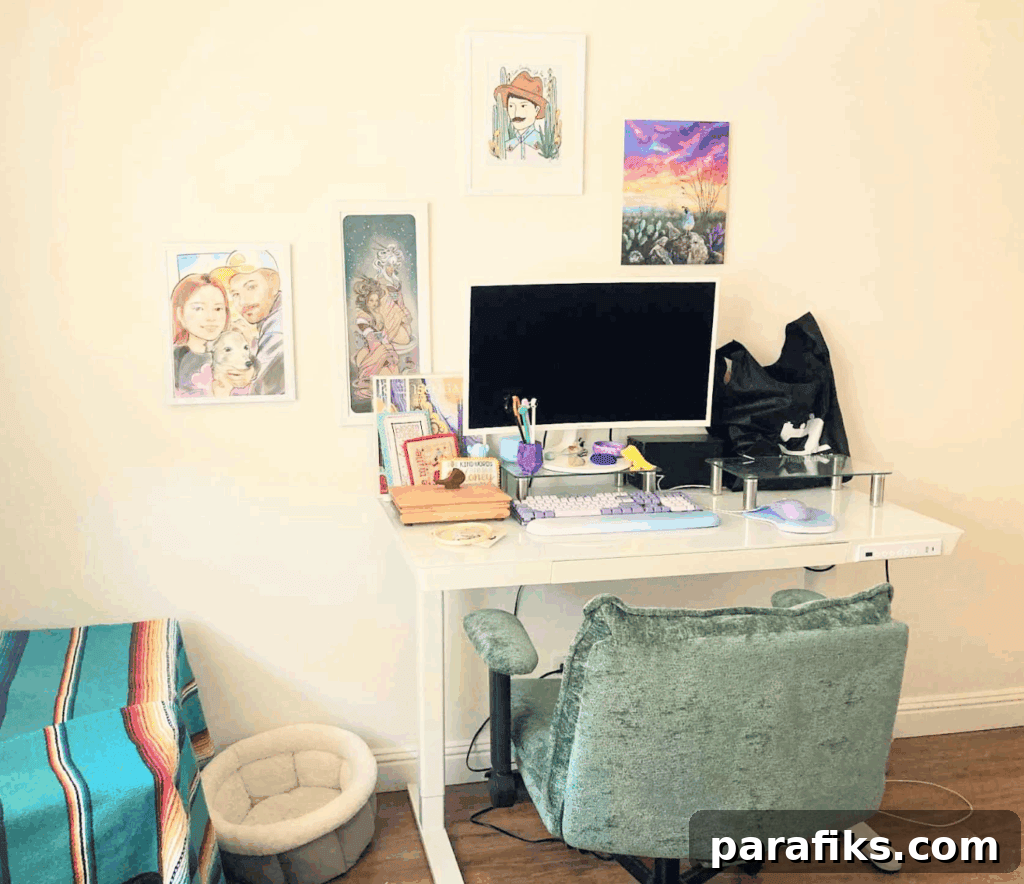
The first priority was finding the right desk and chair. I wanted a bright workspace with light tones and some pops of color, so I chose a white glass standing desk that I highly recommend. It has programmable height presets so you can save sitting and standing positions instead of manually adjusting every time. Even if you think you won’t use the standing option often, having the ability to alternate between sitting and standing helps reduce stiffness and improves comfort during long days.
I also discovered cross-legged chairs that provide extra room to sit the way I naturally do. I bought a green cross-legged chair and it’s been a great fit. Comfort and posture matter when you work from home full-time, so I also invested in a posture corrector to help maintain proper alignment.
Daily Tech I Use
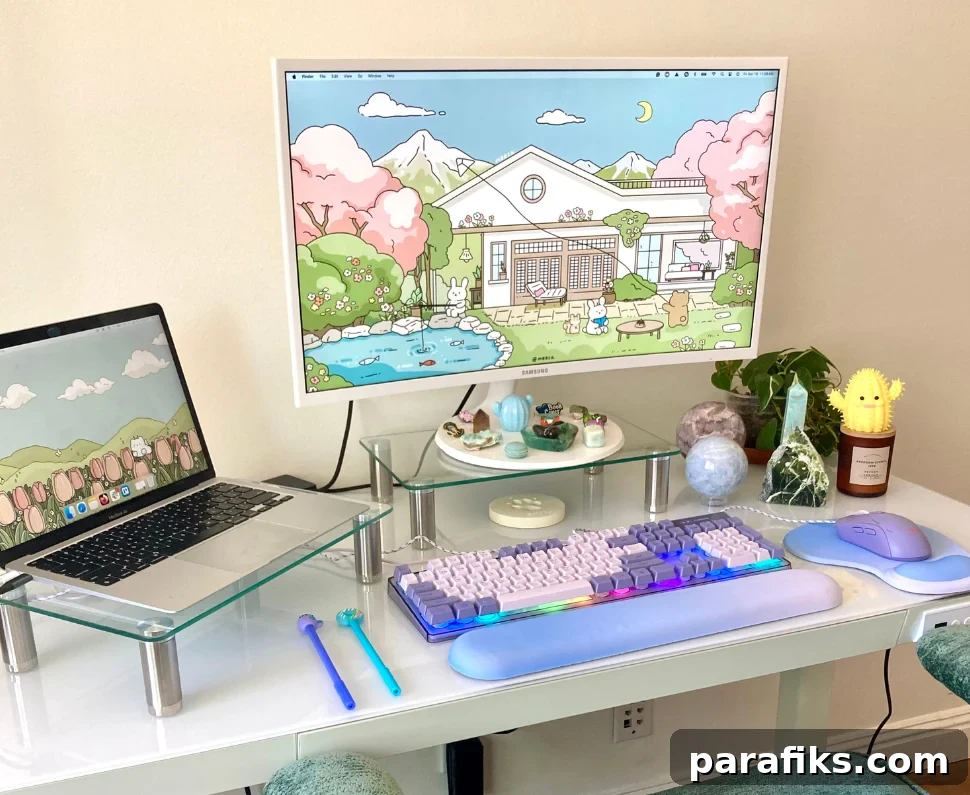
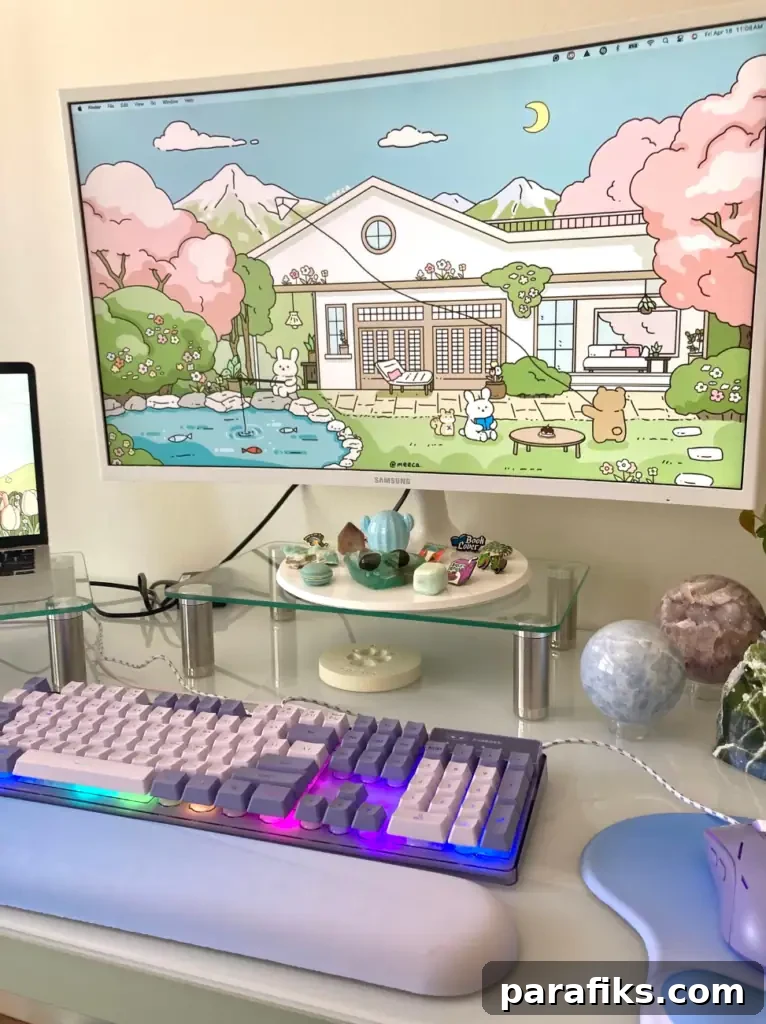
After the desk and chair, I focused on monitors, keyboard, mouse, and other peripherals. I’d heard positive things about curved monitors for eye comfort, so I chose a Samsung curved screen and saved by buying a refurbished unit. I picked a white model to keep the workspace bright.
To keep both my Mac laptop and external monitor at eye level, I use two glass monitor stands. For a bit of fun and personality I added a light-up keyboard and mouse. I also use an ergonomic wrist rest for comfort while typing and cord organizers to keep cables tidy and out of the way.
Favorite Tools and Software
As a project manager working remotely, I rely on several tools that help me stay organized and collaborate effectively. Even if you’re not a project manager, many of these apps are useful for remote work:
Project management: ClickUp, Trello, Notion.
Communication: Gmail, Slack, Zoom, Google Meet.
Accounting and payments: PayPal and QuickBooks.
My advice is to test tools with free trials and pick what fits your workflow. There are plenty of options tailored to freelancers and remote teams.
Comfort Items That Improve the Space
Small touches make a big difference. I add candles, plants, a cozy throw blanket, a few crystals, and framed artwork to personalize the room. These items help the office feel inviting and calm, which improves focus and creativity.
My Daily Routine
I usually start my workday at 6:00 a.m. and wrap up between 1:00 and 2:00 p.m. By keeping a compact workday I can maintain high focus and still have afternoons free.
I walk my dogs for about 30 minutes at 9:00 a.m. for fresh air and a break from the desk. I keep lunch short to finish work earlier and structure tasks from highest to lowest priority so the most important items get done first.
To reduce distractions I put my phone on Do Not Disturb during work hours, keep my desk tidy, and play non-lyrical background music to maintain concentration.
Lessons Learned From Working at Home
If I could start over, here’s what I would do differently:
- Use a standing desk from the beginning.
- Prioritize good posture early on.
- Avoid working from bed to keep work and rest spaces separate.
Creating a dedicated office helped me clearly separate “work” from “home.” For years I was working all over the house — the bedroom, couch, kitchen table — which made it harder to switch off. A defined workspace supports better routines and mental boundaries.
Frequently Asked Questions
Here are answers to common questions about setting up a home office.
Do I need a fancy setup to work from home?
No. My complete setup cost under $800, and you can save more by buying used or refurbished equipment. Thrift stores, refurbished listings at major retailers, and local marketplaces are great places to find quality items at lower prices.
What should I invest in first?
Start with the desk, chair, and a good screen. The desk is the foundation of your workspace and is worth prioritizing. Standing desks are more affordable than ever — mine was under $200 — and they’re a worthwhile investment for comfort and health.
What if I don’t have a separate room?
If you lack a spare room, find a quiet corner or use fold-away options like wall desks or Murphy desks. Maximizing vertical space and choosing compact furniture can make a small area highly functional.
Do you dress up or stay in pajamas?
I find that changing out of pajamas helps me get into a professional mindset, but my at-home outfits are casual and comfortable. The goal is to feel put-together enough to focus while staying comfortable.
How do you stay focused?
To stay focused, try these tactics:
- Use Do Not Disturb on your phone during work hours.
- Set clear work hours, especially as a freelancer.
- Use time-blocking or the Pomodoro technique to create focused work sessions.
- Take movement breaks to refresh your energy and avoid burnout.
Summary: What I Use Every Day
Here’s a quick list of the main items in my home office:
- White glass standing desk
- Cross-legged chair
- Posture corrector
- Samsung curved monitor
- Two glass monitor stands
- Light-up keyboard and mouse
- Ergonomic wrist rest
- Cord organizers and holders
Designing a home office that fits your needs is an enjoyable process and can be done affordably. A well-planned workspace improves productivity and makes work feel more enjoyable.
What’s your favorite item in your work-from-home setup?
Recommended reading:
- 21 Best Entry-Level Work-From-Home Jobs
- 22 Real Online Businesses You Can Start From Anywhere
- 12 Surprising Work From Home Jobs You’ve Probably Never Heard Of
- 9 Easiest Work at Home Jobs That Require Zero Experience