

Update February 2025: Recently there has been increased discussion about how Honey handles affiliate commissions and coupon codes. Some users report that the extension doesn’t always surface the best discounts and may favor certain retailers, while others have noticed a decline in the number of usable coupons. It’s unclear whether Honey’s systems have changed, so for now it’s wise to use it with some caution.
Do you do a lot of shopping online? If so, consider installing Honey and reading this PayPal Honey review.
Honey (also called PayPal Honey) is a popular coupon and savings browser extension that searches for discount codes and automatically applies them at checkout.
After you install the Honey browser extension, it scans for available coupon codes and promo offers and attempts to apply the best one to your shopping cart. Honey supports over 30,000 retailers across categories like restaurants, apparel, travel booking, home goods, and more.
In addition to coupon code searching, Honey offers a rewards program where you can redeem points for cash, gift cards, or PayPal shopping credits.
I recommend using a money-saving browser extension such as Honey because it does the heavy lifting for you. It removes the need to remember or manually test coupon codes—Honey runs the checks automatically.
Key Takeaways
- Honey helps find and apply coupon codes automatically at checkout.
- It includes price tracking and alerts to help you buy at the right time.
- Over 30,000 retailers participate, increasing the odds it works with stores you already shop at.
- Reported average annual savings per user is about $126.
Honey Review
Below is a detailed PayPal Honey review covering what the app does, how to install it, its key features, pros and cons, and useful comparisons.

What is Honey?
Honey is a free extension designed to simplify online shopping and reduce costs. It searches for and applies available coupon codes and promo offers automatically when you reach checkout.
Millions of people use Honey, and it works with tens of thousands of stores including well-known names like Lowe’s, Macy’s, Sephora, Udemy, Finish Line, Nike, J.Crew, and JCPenney, among others.
Whether you’re ordering food delivery, buying shoes, or booking travel, Honey can often find a discount or show price history to help you decide when to buy.
Honey began as an independent company and was acquired by PayPal in 2020. The extension is available in multiple countries, including the United States, Canada, Australia, the United Kingdom, and India.
How to install the browser extension
Installing Honey is straightforward. The extension is compatible with major browsers such as Google Chrome, Mozilla Firefox, Apple Safari, Opera, and Microsoft Edge. Installation typically takes less than a minute.
Key Features of Honey
Honey offers multiple tools that help you save money automatically and track prices so you can buy at the right moment. Below are the main features that make Honey useful for online shoppers.
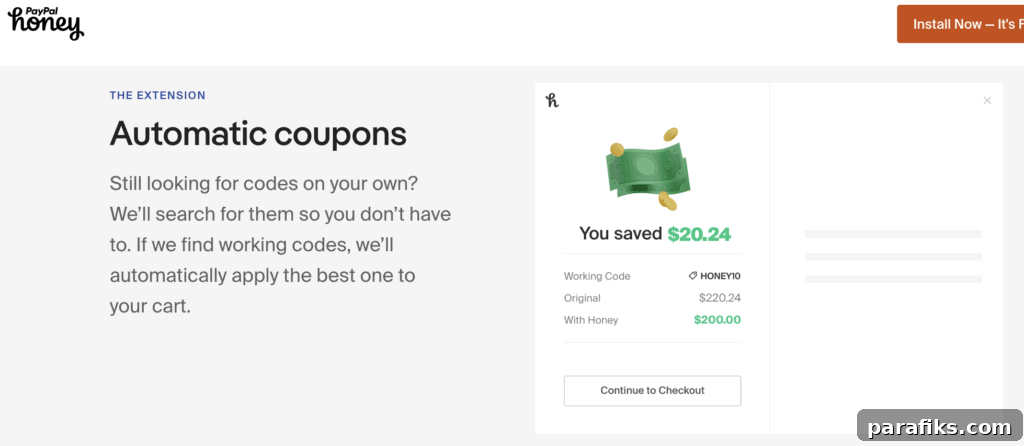
Honey extension
Once installed, the Honey extension works in the background while you shop. At checkout it automatically pops up and tests available coupon codes, then applies the one that yields the largest savings. This process requires no extra effort from you—just shop as usual and let Honey attempt to save you money.
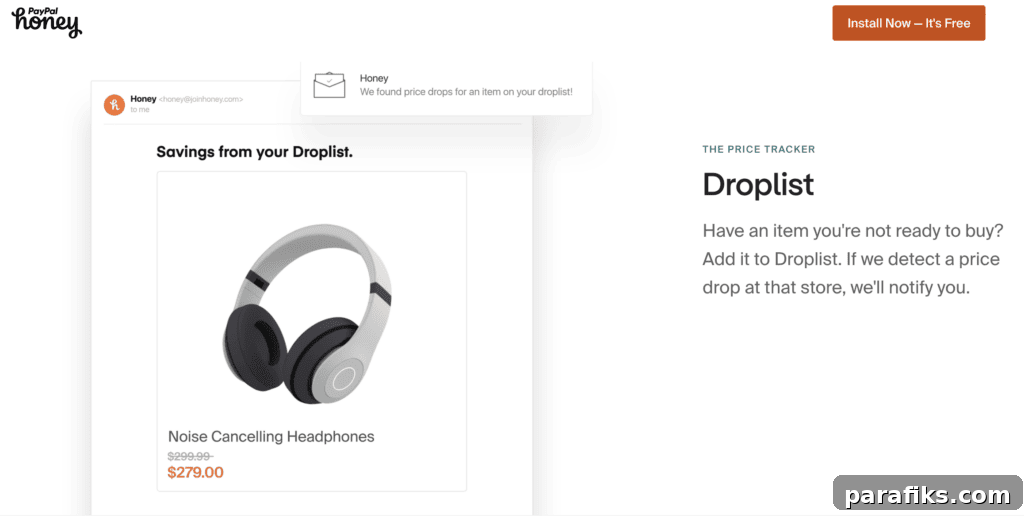
Price tracker (Droplist)
Honey’s Droplist feature tracks price changes for items you’re watching. If an item is currently too expensive, add it to your Droplist and Honey will monitor the price and alert you when it drops. You can also view historical price charts to judge whether a current price is a good deal.
Droplist supports many popular retailers, including Amazon, Macy’s, Target, and Walmart, making it useful for catching sales and timing purchases.
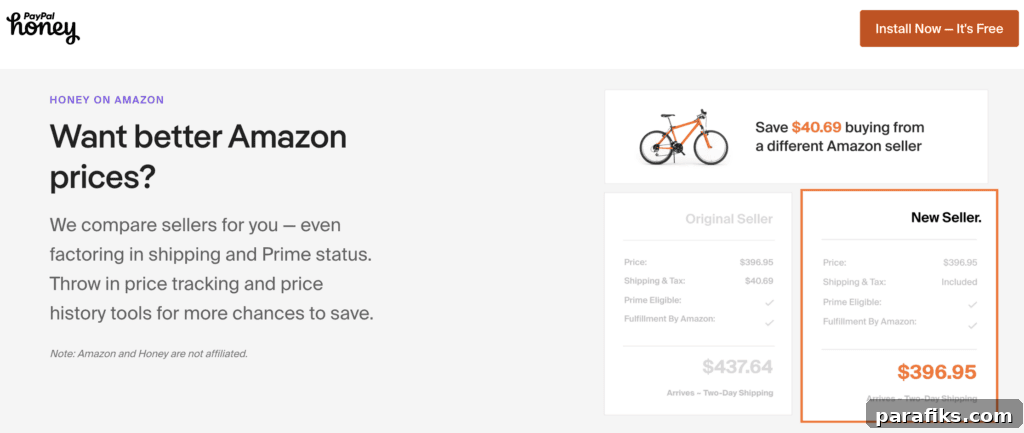
Amazon Price Comparison
On Amazon product pages, Honey’s price comparison tool checks other sellers for lower prices and displays the item’s price history. This helps you determine whether the current offer is competitive and whether you should wait for a drop.
PayPal Rewards (Honey Gold)
Honey offers a rewards program—PayPal Rewards (formerly Honey Gold)—that awards points, which can be redeemed for gift cards or PayPal credits when you shop at participating retailers. Not every store participates, but many popular retailers do. After qualifying purchases, points are typically credited after a processing period that can take several weeks.
Once you accumulate enough points you can redeem them for rewards such as gift cards in various denominations.
Honey mobile app
The Honey mobile app mirrors much of the browser extension’s functionality. It organizes participating stores and offers a Honey bar in the in-app browser to help you find savings when you check out on mobile sites. The mobile app and browser extension work together to help you save both on desktop and on your phone.
Honey App Pros and Cons
Here’s a concise summary of Honey’s main advantages and limitations to help you decide whether it fits your shopping habits.
Advantages of using Honey
Honey simplifies savings by automatically finding and applying coupon codes, saving you time and effort. It also provides price tracking, historical price data, and a rewards program—features that can help lower the total cost of purchases over time.
Disadvantages of using Honey
Honey does not guarantee a working coupon for every purchase. Some codes may be expired or produce minimal savings, and not all retailers participate. Users should be aware that while Honey often helps, it won’t always produce a large discount or work on every site.
PayPal Honey Alternatives
If you’re evaluating Honey, it helps to compare it with similar tools like Capital One Shopping to decide which extension suits you best.
Honey vs Capital One Shopping
Honey and Capital One Shopping offer similar functions: both are free browser extensions that search for coupon codes and try to apply the best option at checkout. Capital One Shopping also provides automatic coupon application and works across major browsers. Choosing between them often comes down to which extension finds better codes for the stores you use and which interface you prefer.
Frequently Asked Questions About Honey
Below are answers to common questions users ask about the Honey extension and service.
Is Honey safe to use? Is Honey legitimate?
Yes. Honey is a legitimate browser extension owned by PayPal that searches for and applies coupon codes. You don’t need to enter credit card details to use the extension; it installs like any other browser add-on and includes an optional rewards program.
Is it free to add Honey to your browser? Is PayPal Honey free?
Yes. Honey is free to download and use on desktop browsers and mobile devices.
Why is PayPal Honey free? How does PayPal Honey make money?
Honey is free to users because the company earns revenue through partnerships and affiliate relationships with retailers. When users redeem offers or activate rewards, Honey may receive a commission from participating stores.
How can you use the Honey extension on your browser?
After installing the extension, Honey appears in your browser toolbar. When you shop at supported online stores, Honey automatically searches for coupon codes and applies the best one it finds at checkout—no extra steps required from you.
Can you get the Honey app on your iPhone?
Yes. Honey is available on iPhone and Android and offers a Safari extension on iOS for mobile website shopping. The mobile app brings many of the same features as the browser extension.
Do I have to use PayPal for Honey?
No. You do not need to use PayPal to use Honey, although Honey is owned by PayPal and integrates with PayPal services for certain reward redemptions.
Are there any good alternatives to the Honey app?
Capital One Shopping is a notable alternative that also automatically finds and applies coupon codes. Which tool is best depends on the stores you use and which extension finds the better deals for your purchases.
Is PayPal Honey and Honey the same?
Yes. Honey and PayPal Honey refer to the same product—Honey was acquired by PayPal and now operates under the PayPal umbrella.
Is Capital One the same as Honey?
No. Capital One Shopping and Honey are separate services that offer similar coupon-finding and savings features, but they are run by different companies.
PayPal Honey Browser Extension Review – Summary
In summary, Honey is a useful, free browser extension that automates coupon searching, offers price tracking and history, and provides a rewards program for participating stores. It can save you time and money by testing promo codes on your behalf and alerting you to price drops.
While it won’t guarantee a savings on every purchase, Honey often finds discounts and helps you avoid expired codes. Installation is quick and straightforward, and the extension works on most major browsers and mobile devices.
What money-saving browser extension do you use?
Recommended reading:
- 20 Best Money Saving Apps (I’ve Used Many Of These Apps!)
- 30 Best Money Making Apps
- Fetch Rewards Review
- KashKick Review: Is It Worth It?
- 16 Real Ways To Earn Free Gift Cards